

Turn a general rebate lookup into a search about your portfolio
Exciting news for every UtilityGenius user: My Buildings has been rebuilt as a portfolio rebate tracking tool. Instead of looking up rebates one utility at a time, you can now save your buildings once and let UtilityGenius tell you where the money is.
With the new My Buildings, you can:
- Identify rebate opportunities for specific addresses
- Prioritize projects by what each utility pays
- Track rebate changes you haven't seen yet
- Download rebate reports for one building or your whole portfolio
- See closing deadlines and bonuses at a glance
- View a map of utility territories for your portfolio
The updates are live now, so go check them out on UtilityGenius!
Understanding What's New
Quickly Tracking What Needs Attention
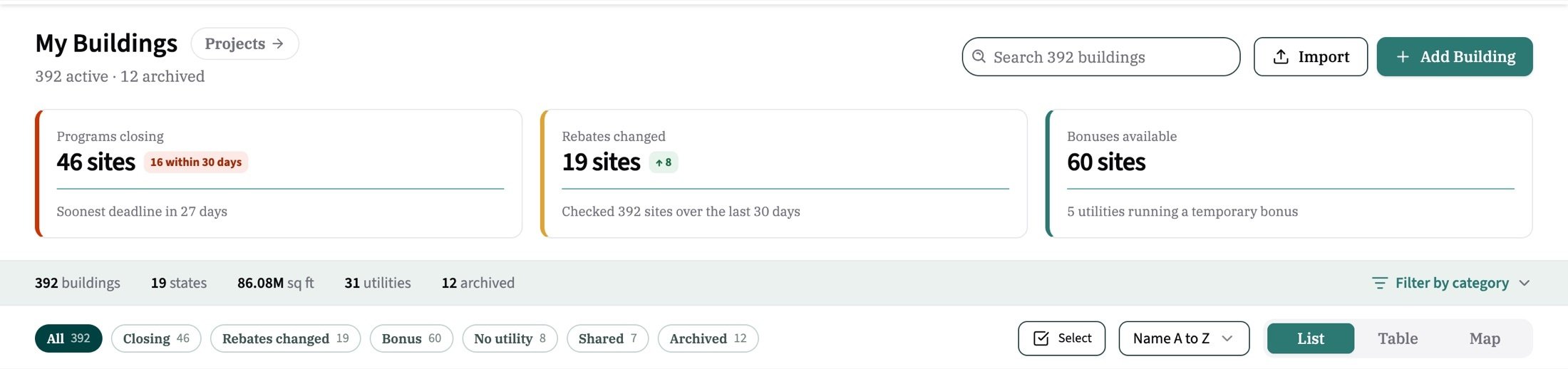
My Buildings now opens to three cards that count your whole portfolio:
- Programs closing soon: buildings with a program deadline in the next 90 days, with a flag for how many close within 30.
- Rebates that have changed: buildings whose rates shifted in the last 30 days that you haven't reviewed yet.
- Available bonus programs: buildings where a utility is running a temporary bonus. The bonus chip links straight to the utility's own terms and program documents.
Under the cards, filter chips narrow your list, and they stack. Pick Closing plus Bonus to see only the buildings that match both. Every filter, sort and view is saved in the page link, so you can send a colleague exactly what you're looking at.
Rank Your Portfolio by Rebate
Use "Filter by category" to pick a measure, like Level 2 EV chargers or heat pumps. Every building then shows what its utility pays for that measure, in real units like dollars per fixture or per port. Sort by highest rebate and your portfolio ranks itself, so you can prioritize projects by where the money is most lucrative.
.jpg?width=2200&height=1277&name=download%20(1).jpg)
Prefer a spreadsheet view? The Table tab puts every field in a sortable column: days until a program closes, changes, rebates, utility, size and rate. Select buildings to tag, share or download them as an Excel report for one building or your whole portfolio.
See Your Whole Portfolio on the Map
The map tab pins every building, colored by status, and the legend doubles as a filter. With a measure picked, zoom in and pins shade by what each site pays. Turn on utility territories to see which utilities serve your buildings, with a site count for each.
.jpg?width=2200&height=1277&name=download%20(3).jpg)
Uploading Your Portfolio
You can add buildings one at a time or import your full portfolio list in one go.
To add a single building:
- Select "View Buildings."
- Select "Add Building."
- Enter the address and building info.
- Explore the available utility, state and federal incentives for that building.
To mass upload a full portfolio:
- Select "View Buildings."
- Select the "Import" button.
- Download the template.
- Fill out and upload the template.
- Begin exploring available rebates.
Left the Utility column blank? No problem. UtilityGenius matches the utility from each building's ZIP code and flags it for you to confirm. Any building still missing a utility shows a "set utility" button that lists the utilities serving that ZIP, so it's a one-click fix.
.jpg?width=2200&height=749&name=download%20(5).jpg)
Group Buildings with Tags
When you create a building or import your portfolio, tags are the best way to group your buildings together. Add a tag at the building level, or select several buildings and tag them all at once. Tags let you:
- Filter your portfolio within UtilityGenius
- Ask UtilityGenius for AI to analyze rebates for a portfolio
- Track program changes by portfolio
Leverage Your Buildings with AI
With your portfolio saved in UtilityGenius, you can use AI to quickly identify opportunities. UtilityGenius is now available in Copilot, ChatGPT, Claude and Gemini. Try one of these example prompts to get started:
- "Are HVAC rebates available for my portfolio tagged [tag name1]?"
- "Where are the most lucrative rebates for a VFD project in my [tag name] portfolio?"
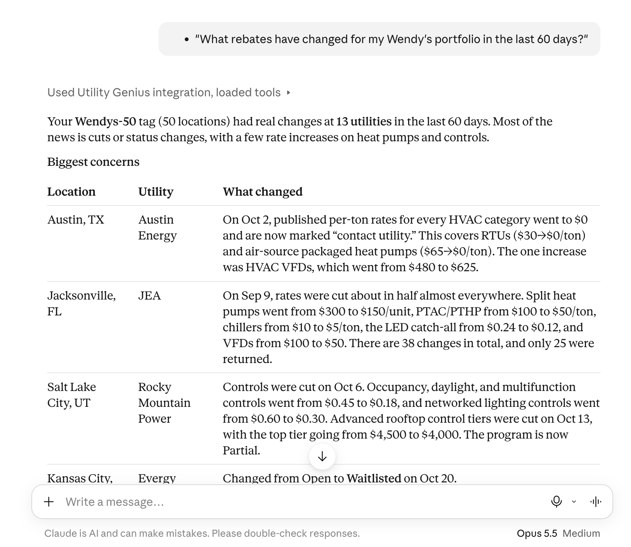
- "What rebates have changed for my [tag name] portfolio in the last 60 days?"
Claude Example:
Ready to Start Tracking Your Portfolio?
Every feature in My Buildings is available on every plan. Try it out for free and upgrade once you love it!
Add your buildings in My Buildings today. Want rebate figures on every building? Ask us about a Team plan. Visit our pricing page to learn more about our account tiers, or reach out with questions at support@utilitygenius.com.